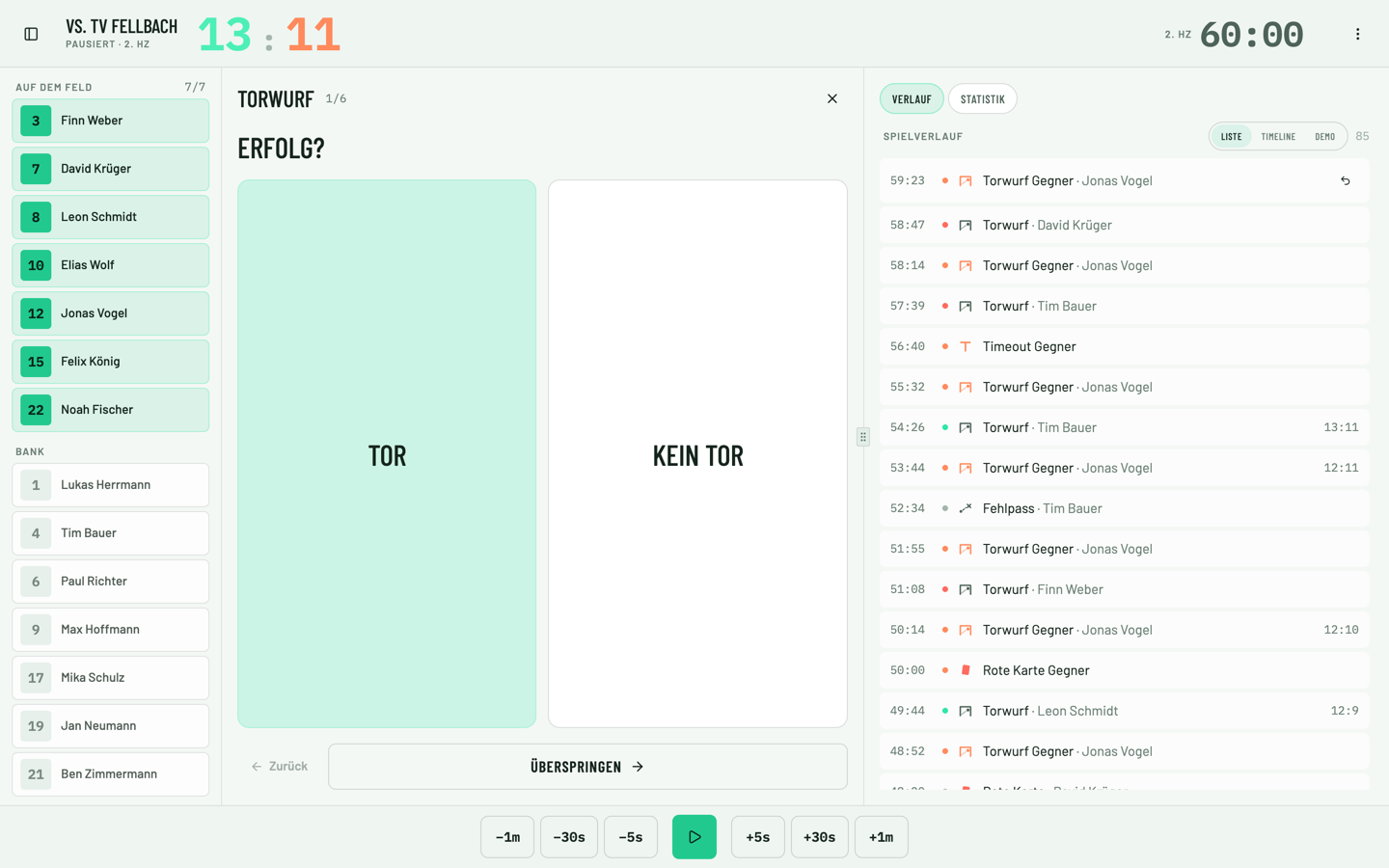
How a shot happens in two taps
You tap the player and the action — a shot on goal, say. The wizard asks: goal or no goal, shot position on the court, where it hit the goal. Every step is a tap on a big target, nothing to type. On a 7-metre throw, the wizard skips the shot position; on a suspension, it only asks for the player. That keeps tracking fast enough to keep up with the match, while still delivering the position data behind shot charts and heatmaps.
Custom button layouts for your system of play
Every team talks differently: first, second, third wave, crossing, transition, fast break, technical error. In SportsFlow you arrange the buttons the way your team thinks, and set up custom actions with follow-up questions — like which play led into an action. Screens for attack, defense and goalkeeping can be built separately, so the tracker never has to search.
Game clock, lineup and score run alongside
The game clock knows halves and suspensions, and every action gets its timestamp automatically. One tap substitutes a player in or out, so the stats always know who was actually on the court — the basis for lineup analysis. With live sync you show the official score next to yours while tracking, so the result and tracked actions match up.
Offline mode: built for arenas without signal
SportsFlow saves every action locally on the device first and queues it to the server as soon as there's a connection. Duplicate entries are detected, order is preserved, and the game clock heals itself after a reload. Nothing changes for you on the sideline — you just keep tracking.
Phone or tablet
On a phone you track with one thumb; on a tablet you see actions and the quick analysis side by side. When the clock stops at a timeout or halftime, the quick analysis jumps straight to the overview without you clicking around in tracking. iOS and Android apps are in the stores, and the web app runs on any device.
Track later, at your own pace
Match over, but the plays are still missing? Just reopen tracking and add them afterward. With match video, you can do that at 0.5x to 4x speed, and every added action lands at the right spot on the game clock. That turns live tracking during the match and catching up in the evening into one complete match analysis.
Pair with opponent
If your opponent tracks with SportsFlow too, pair the match via QR code or 6-character code. From then on each side tracks only its own attack: your shots arrive in your partner's match as opponent shots, theirs arrive in yours. You both end up with the full match, even though each bench logs only half. Player names are only sent if a side turns on "Send player names"; otherwise you see jersey numbers only. Your opponent roster and notes stay private. Pairing works on every plan.
Live ticker for fans and parents
What you track is live right away. Your team sees the score on the lock screen in the app, as a Live Activity on iPhone or an ongoing notification on Android. Fans and parents don't need an app: the shared match link runs a live ticker in the browser, and web push announces kick-off, half-time and full-time on its own. The fan live ticker comes with the Team plan and up.