Video analysis, from cut to big screen.

Bring your match video into the preparation, cut scenes in the video studio, show them in your video session, and jump to any tracked action.

No time limit, no credit card.

ScenesEvery tracked action jumps to its moment in the video
  • 58:43Goal · #7 Hofmann
  • 57:12Goal · #23 Weber
  • 55:48Save · —
  • 54:30Missed shot · #4 Brandt

Video analysis in amateur handball rarely fails because of the camera — it fails because of time: two hours of match to scrub through for twelve scenes. SportsFlow links your match video to the actions you've tracked. One click on the missed shot in minute 43, and you're in the scene — no searching.

Your preparation for the next match builds on that: in the video studio you cut scenes, add tags and mark who they involve. In your video session you show them on the projector, tag by tag. Then you share the preparation with your team, and every player sees “Your scenes” first. Video analysis is part of the Pro plan; live tracking and plays are free on Starter.

Handball

What's included

Built for the sideline — not for the desk.

Sync

Match report and video in step: every action jumps to its moment in the video. The automatic sync only applies suggestions it is sure about.

Video studio and present

Cut, tag and annotate scenes as freeze frames, then show them tag by tag in your video session.

Opponent preparation

Scenes about an opposing shooter land in their profile, next to the shot chart and rates.

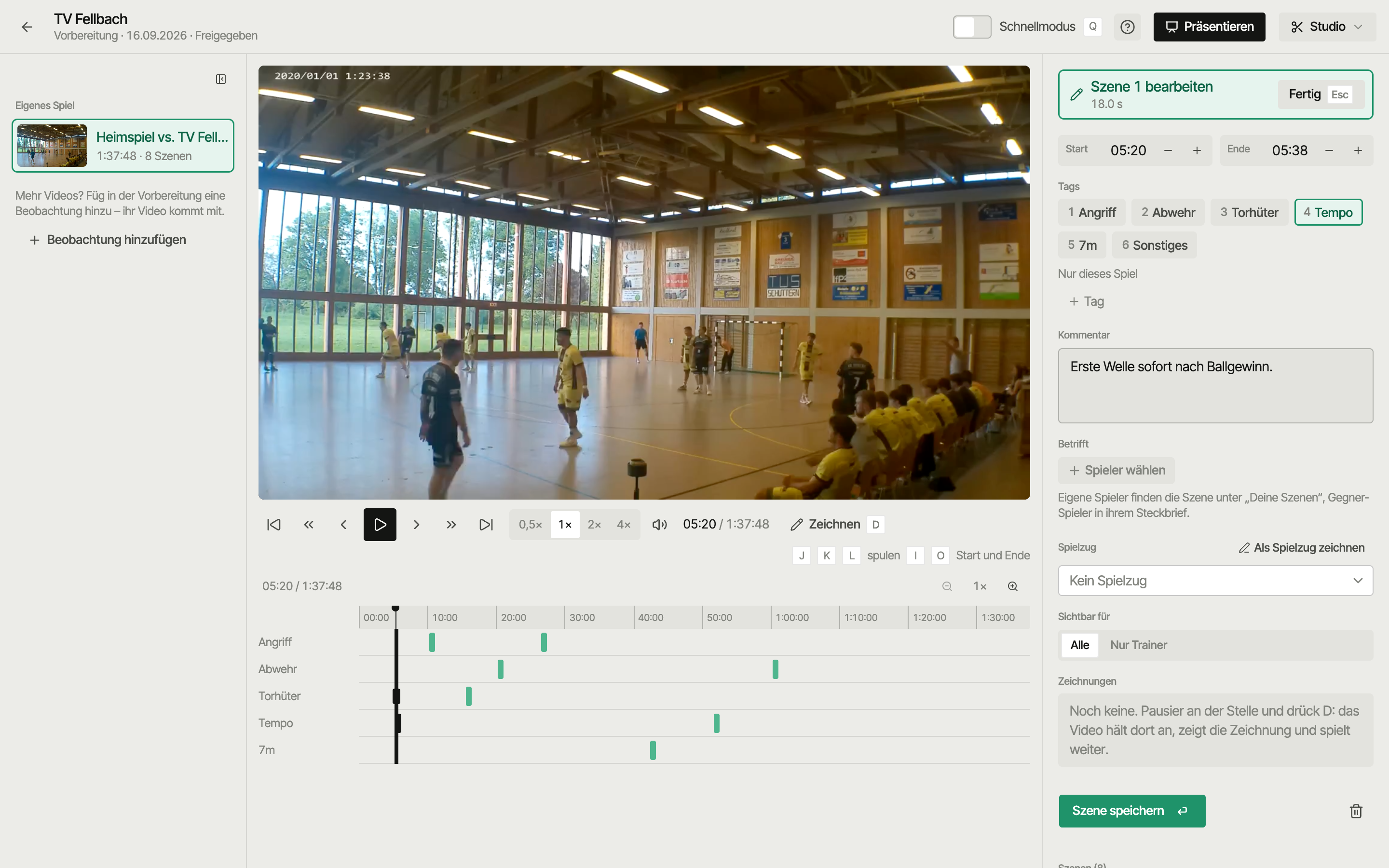
Video studio in SportsFlow: cutting scenes with one lane per tag and an inspector with tags and involved players

What video do I need?

A completely normal match recording is enough: a phone on a tripod in the stands, a hall camera or a parent’s footage. No special setup, no multi-camera rig. Upload the video, link it or pick an existing one; uploads play in the studio right away while the upload finishes in the background. To sync, SportsFlow uses the recording time and detected whistles and only applies suggestions it is sure about; for each half you check against a goal. After that, every action knows its second in the video.

From event to scene: actions as jump marks

The action list next to the video is your navigation. Click a 7-metre throw, and the video jumps a few seconds before it. Filter by player, action or half to see only the misses from the back court, or only your goalkeeper's saves. Two hours of match become ten minutes of relevant scenes — that's the difference between watching video and analyzing it.

Cut, present and share scenes

A scene is a clip with a start and an end, with one or more tags like defence, fast break or 7m, a comment and the players it involves. In the video studio you set start and end with I and O, see one lane per tag and draw running lines as freeze frames. In your video session you show the scenes on the projector, tag by tag. You share the preparation with the whole team; scenes set to coaches only stay with the staff, and you see who has watched.

Opponent prep straight from the video

You track the opponent too — shots, positions, where it hit the goal — and get the same shot chart as for your own team, just in orange. Whoever shoots for the opponent you collect in a scouting session: a match your next opponent played, shot by shot, turned into a profile per shooter. Bring that match’s video into the preparation, cut scenes from it and assign them to the shooter under “Involved”, and they show up in the profile. Where the back court shoots, how the transition runs, what happens on 7-metre throws: that fits into a locker-room talk instead of an evening at the laptop.

Tracking later from video

Not every match gets fully tracked live. With the video you add it afterwards at your own pace, at 0.5x to 4x speed, with the same game clock as live tracking. Every added action lands at the right second and works as a jump mark in the video straight away.

Who is video analysis worth it for?

For teams preparing more than one match a week, or developing players individually: regional league and up, ambitious youth teams, goalkeeper coaches. Recording costs nothing, tracking is free, and the Pro plan with video costs €45 per month or €449 per season — cancel the monthly plan once the season's over.

FAQ

Quick answers

What videos can I upload?

Completely normal match footage, e.g. from a phone or an arena camera. No special setup needed.

Does tracking work without internet in the arena?

Yes. SportsFlow keeps tracking offline and syncs once you're back online.

What does SportsFlow cost?

Starter is free forever. Video analysis with studio, present and sync is part of the Pro plan for €45 per month or €449 per season.

How much video storage do I get?

The Pro plan includes 100 GB — enough for a full season in good phone quality.

Can players see the videos?

Yes, the shared scenes: you share the preparation with your team, and every player sees “Your scenes” first in the app. Scenes set to coaches only and raw scouting videos stay with the coaching staff.

Your sideline, digital.

Get started with nothing to lose: Starter is free, and your first match is set up in five minutes.