What is an observation?
An observation isn't a match of your own. You scout a match between two opposing teams your team isn't involved in — say, your next opponent against a third team. You pick Team A and Team B, decide which side you're watching, and only capture their throws. No score, no clock, no minute: an observation is a shot-chart capture tool, not a scored match. It never counts toward your own stats, never shows up in season analysis, and can't be shared as a match link. It's only ever analyzed in the opponent section of the team being observed — where the profiles are built. A YouTube link can run alongside while capturing (Pro and up), but it doesn't provide timing.
The four taps per throw
Tracking opens a full-screen flow with one step per view. First: who's shooting? The opponent roster as big number tiles, and a new number is added instantly via "+ number". Second: tap the shot position or drag the run path with your finger to the shot spot — the big "7m" button skips this step. Third: goal, no goal, or blocked; blocked saves instantly. Fourth: shot type and trajectory are pre-filled, and a tap inside the goal sets the exact spot and saves the throw. A point inside the frame on "no goal" means saved, outside means missed. Then it's back to step 1 — the shooter is never preselected, every throw starts with the number.
Reading a profile as a goalkeeper
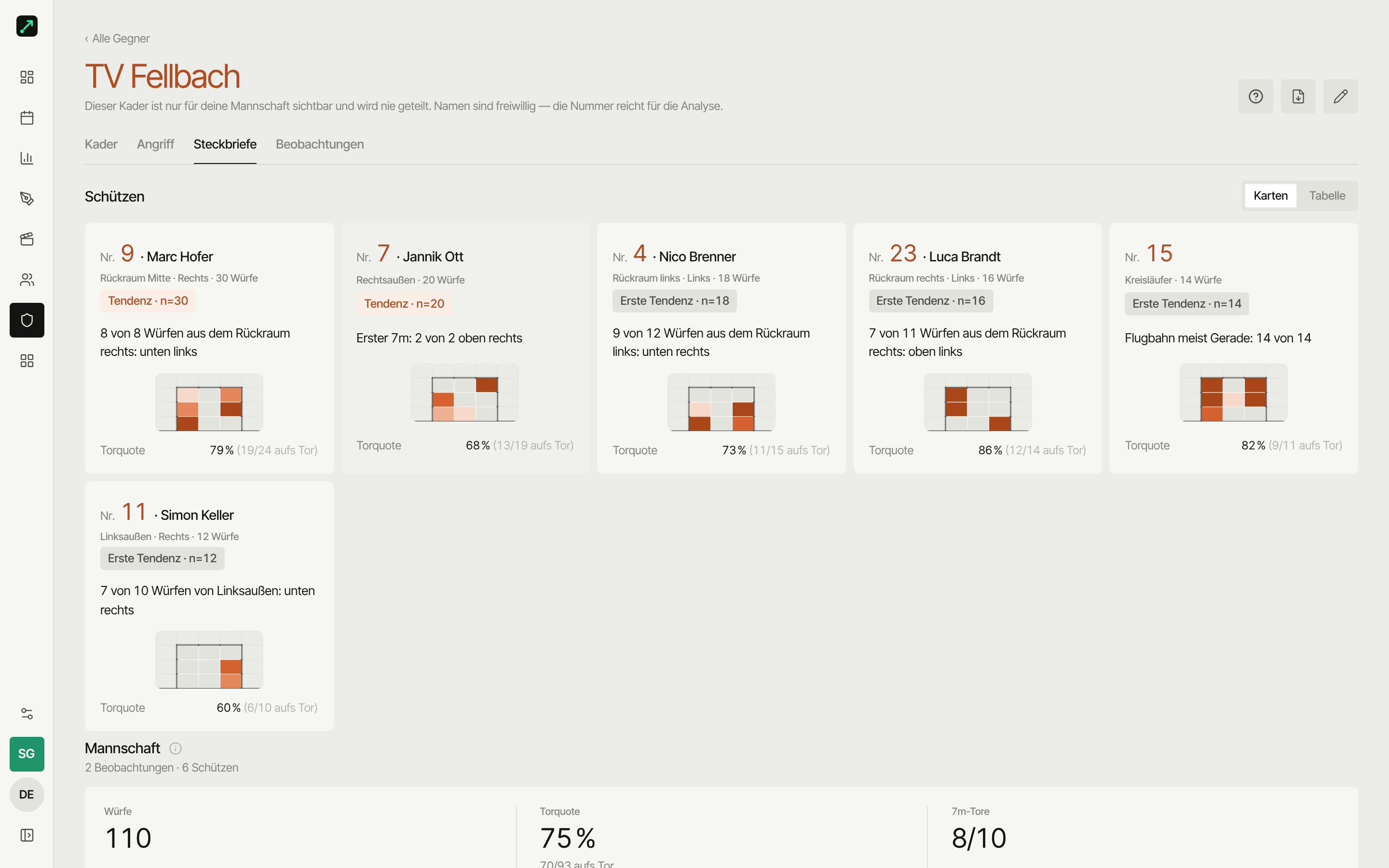
For each shooter, the profile shows number, name, captured throws and, at the very top, the top-3 facts as sentences: favorite corner, 7-metre corner, preferred shot type — as long as there are at least four throws with at least 60% share, or three for 7-metre throws. Below that: the shot chart, where it hit the goal (saved/scored), the 7-metre corner and shot type. Opponent shots are orange and the shape shows the outcome: filled means it went in, outline means saved, faded means missed or blocked. A sample-size badge tells you how reliable that is: under five throws "too few", 5–19 "early trend", 20 and up "trend". Add your own coaching notes — visible to players only with the "share with players" checkbox, otherwise internal only.
Run paths instead of zones
A zone-based shot chart tells you the 7 scores from the left back court. A run path tells you where she's coming from: does she cross from the middle block, run the transition, cut in from the wing? While capturing, you drag the path across the court with your finger; the last point is the shot spot. In the profile you see the lines per shooter, with throws that have no run path shown as a point. Without any run paths, the shot chart automatically switches to zones with a rate per court zone, clickable as a filter; without a single shot location, you get the raw numbers. 7-metre throws all land on the same point and therefore only show up in the throw counter and the goal chart.
Importing match reports
You don't have to sit in the arena for every match yourself. With "Import match report" you take over finished matches of an opponent against third teams, e.g. from handball.net or Handball4All — several at once. Each match becomes an observation, and numbers and names from the lineup land in the opponent roster on import. Only ticker data gets imported: goals, 7-metre throws, suspensions, timeouts — no shot location. Goals still count in the profile but don't feed into any rate; the "shot chart missing" note flags exactly that. If you then observe a match of that team yourself, the shot locations get added. handball.net supplies names, Handball4All only the numbers from the ticker. A second import of the same matches doesn't create duplicates.
The opponent roster stays private
The opponent roster is org-private: only your team sees what you note about an opponent. It never appears in a public match link and is never shared with other teams — not even when you pair a match: each side only exchanges its own shots, and names only if the other team turns on "Send player names". In the roster you maintain number, optional name, position, throwing hand and a note per player; any number you tap for the first time during an observation goes straight in. A name you've entered yourself is never overwritten by an import. Only jersey numbers and throw data ever reach your players — names only if they're already in the roster, notes never without the "share with players" checkbox. Only coaches and goalkeepers see the raw video of an opponent's match.
Who is it worth it for — and what does it cost?
For goalkeeper coaches who want to know where the back court shoots before the first whistle. For coaches at regional-league level and above who watch the next opponent anyway and don't want to dictate insights from memory anymore. For youth teams learning to scout without video editing. Opponent roster, observation and profiles come with the Team plan for €25 per month or €249 per season; the prep where your goalkeeper sees profiles first, plus video while capturing, starts at Pro for €45 per month or €449 per season. Starter is free forever — profiles can be viewed there, but you can't create an observation. Cancel the monthly plan anytime once the season's over.